Nested State Machines in Godot
I use this class to create all the complex behavior I need in my Godot projects. For instance, the enemies in Until Dinner.
The Code
extends Node
class_name State

@export var current_child_state: State

func _start():
	if current_child_state != null:
		current_child_state._start()

func _loop(delta):
	current_child_state._loop(delta)

func _physics_loop(delta):
	current_child_state._physics_loop(delta)

func _end():
	if current_child_state != null:
		current_child_state._end()

func switch_state(new_state):
	current_child_state._end()
	current_child_state = new_state
	current_child_state._start()

func _process_input(event):
	if current_child_state != null:
	current_child_state._process_input(event)
The Ordinary Part
To create a new state you add a Node to the scene and add
extends State at the top of its script.
State class has 5 functions:
_start()
which gets called once when the state gets activated.
_end()
which gets called once when the state is being deactivated.
_loop(delta)
which gets called every _process as long as the state is active.
_physics_loop(delta)
which gets called every _physics_process as long as the state is active.
_process_input(event)
which gets called when there's an input event and the state is active.
The Nested Part
States can also have child states and will call all 5 functions of its active child state when its corresponding function gets called. This is where the nested nature of this structure comes into play. This is also why we don't need something like a StateMachine or a StateManager class. We will nevertheless need a singular root state that doesn't have any sibling state and is the parent of all states. This root state does require integrating the functions we've talked about, with Godot's system. Here's what what that looks like:
func _process(delta):
	_loop(delta)

func _physics_process(delta):
	_physics_loop(delta)

func _input(event):
	_process_input(event)
That's it! As far as gdscript goes, you just have to call these 3 functions in the root state. Of course, it also needs to have the
current_child_state
variable to be set in the inspector.
Switching States
get_parent().switch_state(%Running)
This is how you switch from states. You set all the State nodes to have unique names in the editor and call this function.
Example Usage
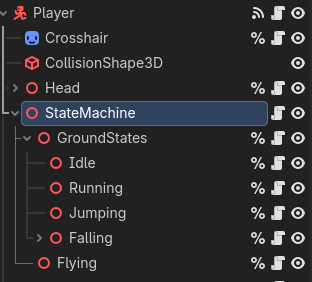
Here's a character controller. All the nodes under the "StateMachine" extend the State class and so does the "StateMachine" node. The nested nature of the states allows for the shared behavior to be in the "GroundStates" node. I don't remember why I extended from Node3D instead of Node here. I think it's better to keep the state nodes as "Node"s though.
Closing Thoughts
Good night!